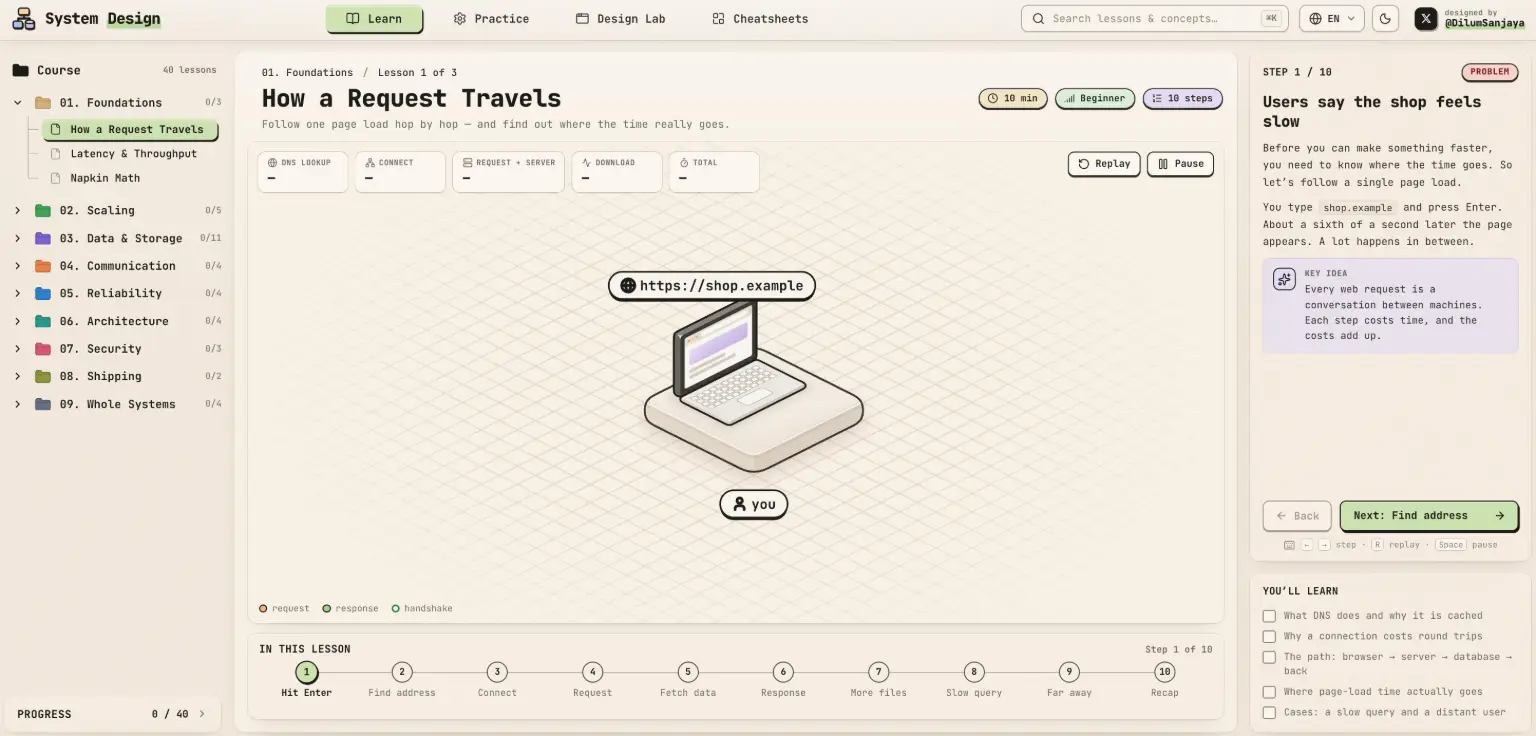
Understanding system design is an important skill for software developers, but learning it isn't always easy. Concepts such as distributed systems, scalability, caching, and server architecture can be difficult to understand through text-based tutorials alone.
That's where Designed to Scale comes in. It offers an interactive approach to learning system design, turning individual concepts into animated diagrams that users can explore step by step.
Instead of simply reading explanations, learners can follow visual representations of how different parts of a system work together.
In this article, we'll explore what Designed to Scale is, how it works, what makes its learning approach interesting, and who can benefit from using it.
What Is Designed to Scale?
Designed to Scale is an interactive system design learning platform built to make software architecture concepts easier to understand.
Its core idea is simple: every concept is presented as an animated diagram that you can step through.
Traditional system design resources often rely on long explanations, static illustrations, and technical documentation. While these materials can be useful, beginners may struggle to visualize how different components interact.
Designed to Scale takes a more visual approach. By presenting ideas through animated diagrams, it helps learners follow the logic behind system architecture one step at a time.
The platform is particularly relevant to developers who want to understand how software systems are structured and how different components work together.
How Does Designed to Scale Work?
Designed to Scale uses interactive diagrams as its primary learning experience.
Rather than presenting an entire architecture diagram at once, the platform lets you move through an explanation step by step.
This approach can make complex technical ideas easier to follow.
For example, when learning how a system works, it is useful to understand:
- Where a user request starts.
- How the request moves through different components.
- How services communicate with one another.
- Where information is stored and retrieved.
- How different parts of an architecture contribute to the final result.
Animated diagrams can help make these relationships more intuitive than reading a paragraph of technical terminology.
1. Learn Through Animated Diagrams
One of the main features of Designed to Scale is its use of animated diagrams.
System architecture often involves multiple components, connections, and processes. Static diagrams can show the overall structure, but they don't always explain the sequence of events.
Animation makes it easier to follow what happens at each stage.
2. Explore Concepts Step by Step
The platform allows learners to step through individual ideas instead of trying to understand an entire system at once.
This is useful when studying unfamiliar technical concepts.
You can focus on one part of an explanation, understand how it works, and then move forward to the next step.
3. Build a Visual Understanding of Architecture
System design isn't just about memorizing technical terms. It's about understanding relationships between components.
Visual learning helps connect abstract concepts with practical architecture.
For example, understanding how a request travels through an application can provide a better foundation for learning about servers, databases, and distributed services.
Why Is Interactive System Design Learning Useful?
System design is often considered one of the more challenging areas of software engineering.
There are several reasons why interactive learning can make a difference.
It reduces cognitive overload.
Large architecture diagrams can contain dozens of components. Breaking them into smaller steps makes the information easier to process.
It makes abstract ideas more concrete.
Concepts such as request flows, service communication, and system architecture become easier to understand when represented visually.
It encourages active learning.
Instead of passively reading an explanation, learners can interact with the material and control the pace of their learning.
It helps connect individual concepts.
Understanding one component at a time makes it easier to see how different technologies contribute to a complete system.
Who Should Use Designed to Scale?
Designed to Scale can be useful for several types of learners.
Beginner Developers
If you're new to software architecture, system design terminology can feel overwhelming.
An interactive visual approach can help you build foundational knowledge before moving on to more advanced technical resources.
Software Engineers
Developers who already know how to build applications may want to understand what happens behind the scenes.
Learning system design can help you make better decisions about architecture, performance, and application structure.
Indie Hackers and Startup Founders
Building a product involves more than writing frontend code.
As an application grows, developers may need to think about databases, infrastructure, service communication, and scalability.
Understanding these concepts can help founders make more informed technical decisions.
Developers Preparing for Technical Interviews
System design is an important topic in many software engineering interviews, particularly for mid-level and senior engineering positions.
Visual explanations can help candidates develop a clearer understanding of architecture concepts before practicing larger system design problems.
Designed to Scale and Traditional System Design Resources
How does an interactive platform compare with traditional learning materials?
| Learning Method | Main Advantage | Potential Limitation |
|---|---|---|
| Text Tutorials | Detailed explanations | Can be difficult to visualize |
| Static Diagrams | Show system structure | Don't always explain process flow |
| Video Courses | Guided explanations | Less interactive |
| Designed to Scale | Step-by-step animated diagrams | Not a replacement for hands-on projects |
These approaches don't have to compete with each other.
A useful learning strategy is to start with visual explanations, use documentation for technical details, and then apply what you've learned through practical projects.
Tips for Learning System Design More Effectively
If you're new to system design, you don't need to understand every architectural concept immediately.
Here are a few ways to make the learning process more manageable.
1. Start With the Basics
Learn how clients, servers, databases, and APIs work before moving into more advanced architecture.
2. Follow Request Flows
Try to understand what happens when a user performs an action in an application. Trace the request from the client to the backend and back.
3. Study One Concept at a Time
Avoid jumping between too many topics. Build a solid understanding of individual components before connecting them into a larger architecture.
4. Build Small Projects
Apply what you learn by creating simple applications. Even a basic URL shortener or task management app can help you understand how different system components work together.
5. Revisit Difficult Concepts
System design involves many interconnected ideas. Repeating visual explanations and revisiting unfamiliar topics can help reinforce your understanding.
Final Thoughts
System design doesn't have to be learned entirely through lengthy technical explanations and complicated architecture diagrams.
Designed to Scale offers a more visual and interactive way to explore software architecture. Its step-by-step animated diagrams provide an alternative learning experience for developers who want to understand technical concepts more intuitively.
Whether you're a beginner learning how applications work or an experienced developer looking to strengthen your architecture knowledge, interactive learning can be a useful addition to your study routine.
If you want to explore a different way of learning system design, visit Designed to Scale and try its interactive course.
Frequently Asked Questions
What is Designed to Scale?
Designed to Scale is an interactive system design course that explains technical concepts through animated diagrams you can step through.
Is Designed to Scale suitable for beginners?
Its visual, step-by-step learning approach can be helpful for beginners who want to understand software architecture concepts without relying entirely on technical text.
What is interactive system design learning?
Interactive system design learning uses visual elements, diagrams, and step-by-step explanations to help learners understand how software components work together.
Why should developers learn system design?
System design helps developers understand application architecture, infrastructure, scalability, and communication between different software components. These skills become increasingly important as applications grow.
Can visual diagrams help with system design interviews?
Yes. Visual diagrams can help candidates understand request flows, architectural relationships, and component responsibilities, making it easier to explain system design decisions during technical interviews.